

Joomla Template
Posted 8 months, 2 weeks ago at 3:56 pm. 32 comments
The original wheat template was released here in November 2007 and in December it won a German design award. Since then it has found it’s way onto over 1000 Joomla installation word wide!
Due to it’s popularity and so many people asking questions, I have released Joomla Template version 1.1 I have also made a separate page for it. Click here to go to the new wheat template page.
The joomla wheat template was initially designed for this site and you can see it in action there!
This site is powered with wordpress and a template called slidingdoor which you can find here. The link above goes to a different site which contains the wheat template.
HI. I love ur template, the idea and the look of it, but i cant install it in my Joomla 1.0.13 Version. I keep receiving errors even when i remove the MAC folder and keep only the inside wheat as zipped, i still cant install it.
Could u please help me on that??
Many thanks
Gio
Sorry to ask you such stupid/basic Q, but how to install wheat? Joomla installer accepts neither the zip file or an expanded directory on the webserver.
Love your design work! Thanks very much for Wheat.
Hi,
I’m trying to install the Wheat layout on my website (looks great by the way!), but Joomla! is telling me that the installation file cannot be found. Any thoughts?
Thanks
I’m guessing these errors are because you are not running Joomla 1.5. I don’t think it will install with an old version of Joomla. I am running Joomla 1.5RC3.
Hi there,
Like the template! Thanks for sharing! Can I ask a newbie question, on the demo-site you refere to at http://mac-host.com/joomla there’s a top menu with the following content: “About Joomla! - Joomla Facts - Joomla Overview - Features - News - The Community”
How do you create that? I thought it was creating a menu and setting placement to “top” but that did not help…
Thanks
Stefan
That menu is in the position user3.
So you make the menu, it is there in the default data installation and it is called ‘Topmenu’
Then you go to Extensions/modules and select topmenu, and place it in position user3.
To make the dropdown menu’s work, set the menu style to ‘List’ and Advanced Parameters Menu Class Suffix to ‘-nav’.
Wayne
Thanks Wayne! You just solved the drop dowm mysteri as well!
Can that featyre be copied back to Milky Way?
Thanks
Stefan
Hi Wayne,
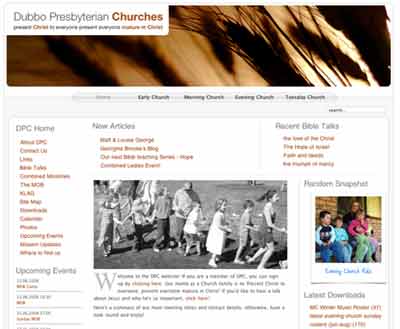
Really like the design concept behind the dubbo.org site which I got mixed up with the wheat template. Was the dubbo site design a template for Word press or custom?
Would be interested in it (a version) for a book blog/site that I would like to start.
Robert
yes, dropdown menus can be copied back to milkyway. if you know a bit of php, you can copy the suckerfish css from the template.css file and put it in the milkyway template.
The dubbo.org site is based on a template called Vistered Little 1.6 and you can find it on many wordpress theme sites and it is free.
Hi,
Thank you for the nice theme. I installed it in 1.5 version. When I click on any link, it gives me http 404 error. It happens for the default template also.
Everything works fine in the older version though.
http://psadmin.org/js - old version
http://psadmin.org/js15 - new version
Opps i gave the wrong link above.
http://psadmin.org/jo - old version
http://psadmin.org/jo15 - new version
Yes that looks like a joomla problem. Try turning off SEF settings, else look on the joomla.org forums for help.
It’s a great template. Thanks Authority.
Hi there. I am using your template for a family site. Everything is perfect except that when a user registers, the success page shows an object id message in the body of the page instead of a message stating registration is successful. Other templates return a message and I just wanted to check with you. The user does get registered and I get the e-mail… so I think it’s just some issue with that result page. Any help would be appreciated. Thanks for the great template. if you would like to see for yourself go to http://myrtlesgate.com
Thanx for the wheat template, I’ll try it in the website we’re building (our first!)
Really like these panels with transparent edges & rounded corners with the larger background photos you have on dubbo.org — Would you share with us how to make them?
Hi Wayne,
Your wheat template looks simple and elegant.
I am trying to get the drop down menus for the topmenu working. I tried the suggestion you gave Stefan. I couldnt get it working.
I added menu items the TopMenu as “Articles » Section”.
and I want the drop downs to be “Categories” in each section.
Can you help me get that working.
Thanks a lot for great work.
Sri
Hi Wayne,
I’ve got the template (mostly) working. I have two issues:
a) I see File does not exist: /var/www/html/joomlascouts/templates/wheat/css/wheat.css in the error log all the time every time a wheat based page is loaded
b) the top graphic usually doesn’t load - there is no clue as to why this happens, everything else seems to work.
fyi: Joomla 1.5 running under Apache on Fedora 4.
Any thoughts?
Wheat’s great, but I’m just have one problem with it. I have topmenu as user3, and I made the Menu Style - List and the Menu Class Suffix: -nav, and the drop down menus still doesn’t work. Any suggestions?
I add an article under Menu/Top Menu, and make it’s parent one of the Menu items, and nothing is showing.
Hello,
your template is great. I´ve got a problem with the menu.
The Internet Explorer and Firefox show different thinks. At IE the menu is more right.
Here is the Site: http://www.mrdesign.biz/praxis-karlstein/doktor-oproiu-reuhl-krebs/
Could you help me?
My E-Mail-Adress is mail[at]reuhl.net
Michael Reuhl from Germany
thanks for the template
Everything works except for the drop menu, I guess it’s just something I have missed. Anyway, it’s a nice template!
Marquisk2, I am a newbie in Joomla and PHP and not sure if we’re having the same issue, 1st the sub-menu does not work well for me, it only appear when I click on the parent link. Until I change from Extensions/modules, select topmenu, Always show sub-menu Items - Yes
Wayne, great design and help you have here. Also congrat for the “design of the month in December 07″
Hi Wayne,
Thank you for making the wheat template available it is great!!
I am having the same problem as Michael Reuhl with the left menu.
The problem is when using 2nd submenus in the left menu they are placed more to the right in IE(7) then in Firefox, Safari or Opera. This causes that 2nd menu items with long names are placed on 2 rows instead of 1 row.
I have tried to adjust this in the template.css, but I can not seem to find the correct code to correct…
I would realy like to correct this. Can you help us out?
Thanks
Chris
Love the template. I am new to Joomla so please bear with me, but how do you change the different area titles that show on the front page (i.e. Main Menu, Latest News, etc.). Also how do I add submenus to the topmenu. Hope you can help and thanks again.
Hi Wayne
We’re going to Joomla 1.5 soon. I adore this template, it’s light, fast and lovely.. I’d really love to use it but I’d want to do a bit more than change the pic , I usually do fairly heavy editing of the CSS to change the colours, is that ok? This probably sounds like a dumb question, it’s usually a given but I wanted to check because I don’t like annoying anyone.
Kathleen
Yep absolutely fine do want you want with it!
Just want to express my gratefulness to you. You’ve helped to solve me the problem with top menu on my Joomla 1.5 site. Thx a lot!
I installed your template on
http://www.jcerni.org/konferencija-Miloradov
It is nice, but somehow I loose shade lines on left side of template. Any advise? The probelm is teh same even if I copy css files form originaltemplate on installed one. Bug in Joomla or so?
Thanks,
veki
Hello
Nice template. I am trying to setup suckerfish pull down menu for my joomla site (using milkyway template). I copied the suckerfish section to the template.css. And it doesn’t seem to work. Can you show me how I can get this to work? I am new to CSS and try to figure out how this works. Thanks in advance.
Hi,
I am using joomla 1.5.2. When I tried to install the wheat template, it told me that it cannot locate the xml set up file. pls help